
Enable Abilities for MCP is my first plugin published on the official WordPress repository — and today marks a personal milestone. In this post, I want to tell you what it does, why I built it, and how you can use it to let AI assistants like Claude interact directly with your WordPress site.
The Context: WordPress + AI Is Now a Reality
On March 20, 2026, The Next Web reported that WordPress.com (Automattic’s hosted platform) enabled writing capabilities for AI agents through the Model Context Protocol (MCP). This allows tools like Claude and ChatGPT to create, modify, and manage content directly on WordPress.com sites.
The news is exciting, but there’s an important detail: these capabilities are exclusive to WordPress.com (Automattic’s paid plans). For those of us using WordPress.org (self-hosted) — which is the vast majority of developers — we need an alternative.
That’s where Enable Abilities for MCP comes in.
What Is Enable Abilities for MCP?
It’s a plugin that extends the WordPress 6.9+ Abilities API by registering a complete set of 32 content management abilities, organized into 7 categories, and provides an admin panel to enable or disable each one individually.
In other words: it gives your self-hosted WordPress the same capabilities (and more) that WordPress.com offers through MCP, but with full control over your infrastructure.
Essential Requirement: The MCP Adapter
For the plugin to work, you need the MCP Adapter — the official bridge that connects WordPress’s Abilities API to the MCP protocol. This adapter is developed by the WordPress team and is available on GitHub:
👉 WordPress MCP Adapter — GitHub Releases
The MCP Adapter handles:
- Transforming WordPress Abilities into MCP-compatible tools
- Managing REST API transport for communication
- Handling authentication and permissions
- Providing observability and metrics
Without the MCP Adapter installed, the plugin cannot expose abilities to AI agents. The plugin automatically detects if the adapter is installed and shows a notice with a download link if it’s not found.
The 32 Abilities of Enable Abilities for MCP
The plugin organizes abilities into 7 categories with granular control:
🔵 WordPress Core (3 abilities)
Native core abilities exposed to MCP:
- Site Information — name, URL, description, language, WP version
- User Information — current authenticated user data
- Environment Information — PHP version, DB server, environment type
📖 Read — Query Only (8 abilities)
The safest ones. They only query data, no modifications:
- Get posts with filters (status, category, tag, search)
- Get full post detail by ID
- List categories, tags, pages
- Get comments with filters
- List media library items
- Get site users
✏️ Write — Create and Modify (9 abilities) ⚠️
Require appropriate MCP user permissions:
- Create, update, and delete posts
- Create categories and tags
- Create pages
- Moderate and reply to comments
- Upload images from external URLs (with auto-assignment as featured image)
🔍 SEO — Rank Math (2 abilities)
Direct integration with Rank Math SEO:
- Get metadata — SEO title, description, keywords, robots, Open Graph, Twitter Card, schema, breadcrumb, cornerstone, and SEO score
- Update metadata — focus keyword, title, description, canonical URL, robots, Open Graph, Twitter Card, breadcrumb, schema snippet, cornerstone, and pillar content
🔧 Utility (2 abilities)
- Find and Replace — in post content
- Site Statistics — summary with totals of posts, pages, categories, tags, comments, and users
🗂️ Custom Post Types — CPT Read (3 abilities)
Full query support for custom content types:
- List Post Types — all registered CPTs with their configuration, supported features, and associated taxonomies
- Get CPT Items — list of items from a specific CPT with filtering, search, and taxonomy query support
- Get CPT Item — full details of a single CPT item including all meta fields, taxonomies, and content
🗂️ Custom Post Types — CPT Write (5 abilities) ⚠️
Complete AI-powered management of Custom Post Types:
- Create CPT Item — creates a new item in a CPT; content is optional since some CPTs store data in custom fields instead
- Update CPT Item — partial update of existing items; only provided fields are modified
- Delete CPT Item — moves to trash by default, or permanent deletion with force_delete
- Get CPT Taxonomies — retrieves all taxonomies associated with a CPT including their terms
- Assign CPT Terms — assigns taxonomy terms to a CPT item; can replace or append terms
Tutorial: How to Install and Configure Enable Abilities for MCP
Step 1: Prerequisites
- WordPress 6.9 or higher (includes the Abilities API)
- PHP 8.0 or higher
- MCP Adapter installed and activated
Step 2: Install the Plugin
- In your WordPress dashboard, go to Plugins → Add New
- Search for “Enable Abilities for MCP”
- Click Install Now and then Activate
Step 3: Configure Abilities
Go to Settings → WP Abilities. You’ll see the complete control panel:
From here you can:
- See the active abilities counter (32/32 by default)
- Enable or disable all abilities with one click
- Control each ability individually by category
Step 4: Generate API Key
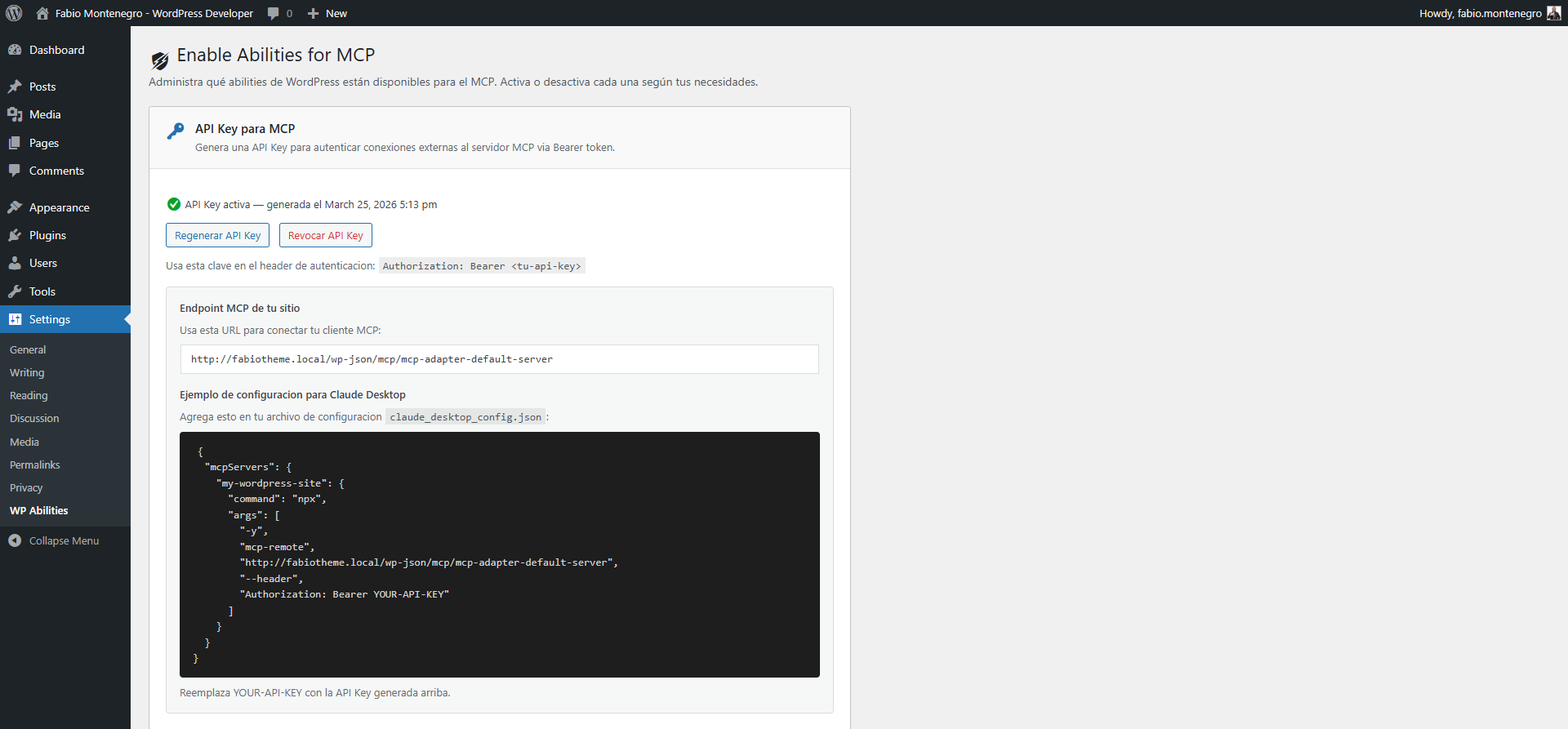
For external connections (Claude Desktop, Cursor, etc.), generate an API Key from the dedicated section:

The API Key is stored as a SHA-256 hash with timing-safe validation. You can regenerate or revoke it at any time.
Step 5: Connect with Claude Desktop
The plugin directly shows the configuration example for Claude Desktop. Copy the JSON and add it to your claude_desktop_config.json file:
{
  "mcpServers": {
    "my-wordpress-site": {
      "command": "npx",
      "args": [
        "-y",
        "mcp-remote",
        "https://your-site.com/wp-json/mcp/mcp-adapter-default-server",
        "--header",
        "Authorization: Bearer YOUR-API-KEY"
      ]
    }
  }
}
Step 6: Manage Permissions by Category
Each category has its own control. For example, read abilities are safe to expose:

Write abilities require more caution and respect WordPress capabilities:

And if you use Rank Math, you can enable SEO management directly from AI:

Security: A Core Pillar
Security was the top priority during the plugin’s development:
- Per-operation capability checks — each ability verifies that the MCP user has the appropriate permissions
- Per-post validation — edit/delete operations verify permissions on the specific post
- Input sanitization — all inputs are sanitized and validated
- No email exposure — user list shows
user_logininstead ofuser_email - No SVG in uploads — prevented as XSS vector
- No server paths — API responses never expose filesystem paths
- WPCS compliant — 100% compliant with WordPress Coding Standards 3.x
- Hashed API Key — stored as SHA-256 with timing-safe validation
WordPress.com vs WordPress.org: The Comparison
| Feature | WordPress.com (native MCP) | WordPress.org + Enable Abilities |
|---|---|---|
| Write operations | 19 operations | 32 abilities (7 categories) |
| Granular control | Per-operation toggles | Per-ability toggles + by category |
| Built-in SEO | Not mentioned | Full Rank Math (read + write) |
| Custom Post Types | Not mentioned | Full support (read + write + taxonomies) |
| Hosting | WordPress.com only (paid plans) | Any server (self-hosted) |
| Authentication | OAuth 2.1 | Bearer token (hashed API Key) |
| Multisite | N/A | Compatible (per-site config) |
| Open source | Proprietary | GPL v2+, code on WordPress.org |
| Price | Requires paid WP.com plan | Free |
What’s Next?
This is just the beginning. Some ideas for future versions:
- More WooCommerce abilities
- Integration with more SEO plugins (Yoast)
- AI activity logs
- ACF (Advanced Custom Fields) integration
- MCP usage metrics dashboard
Install It Now
If you use self-hosted WordPress and want to give AI controlled access to your site, try the plugin:
👉 Enable Abilities for MCP on WordPress.org
👉 MCP Adapter (requirement) on GitHub
Have questions, ideas, or feedback? Leave a comment below, visit my full portfolio, or find me on LinkedIn.